Showing posts with label and then she snapped. Show all posts

Thursday, July 28, 2011

Cherries Jubilee


Before:
cherries-jubilee-sooc


After:
bowl-of-cherries-2


Photobucket  and then, she {snapped}


cherries-jubilee-sooc bowl-of-cherries-2

For this edit I ran Nelly Nero's Blush action.
{I'm pretty sure}
As well as boosted the fill light and saturation.
Then I cropped slightly to get rid of the bare floor in the upper right corner.

Friday, July 15, 2011

At the Farmstead


gone-fishin-with-ducks---8x


Yesterday I took the kids to a local children's farmstead. 
We go multiple times per year. {because it's free!}

But this time we fished. 
I hope my children know how much I love them, because slimy wiggly worms and my bare hands is not my idea of a good time. Let alone putting them on a hook. But I manned-up and did it!

{When we were all done, I set up the shot above. I absolutely love it.
...the old pole, the pale of worms, the ducks, the wooden bench, the weeping willow...
I couldn't have asked for better props!}

{for this shot I ran PTM's Heart and Soul action x2}

  and then, she {snapped}   Favorite Fridays at Skinned Knees


2011-07-14_Deanna-Rose_1074

However, I must not know how to put a worm on a hook properly, because the fish would eat the worms right off the hook with ease.

This is the closest we came to a catch.


Photobucket


goat


They also have little goats that can be bottle fed.
So we did that too.
This guy was a bit ornery...but you probably already knew that by the look in his eye.
You can't tell from this shot, but he was standing on a tree stump...which made it much easier to nibble at people's shirts!


Give me your best shot at Better in Bulk PhotoStory Friday   Photobucket 

Friday, July 8, 2011

A Surprise View


Approaching-CC

This one might be a stretch for a sunset - it was about 8pm, so the sun was technically on it's downward decent...

Anyway, this was the view we had as we neared the small and rather quaint town where my in-laws live. I took this out the dirty car window, going 70mph. It was a pleasant surprise to see this shot when I brought it up on my computer. I love the silhouette of the silo and the one lone bird sitting on the power lines, as well as the subtle rays of sunlight.


  and then, she {snapped}   Give me your best shot at Better in Bulk PhotoStory Friday    Photobucket Skywatch Friday

Friday, July 1, 2011

Carousel Dreaming


Y'all have no idea how long I've been waiting to get this shot!!!
Carousels aren't exactly a commonplace thing around here...well, they will be this weekend I'm sure...but anywho, there's one at Kaufmann Stadium where the Royals play. It's part of a pretty cool kid's zone where they have a splash park, mini golf and batting cages in addition to the standard playground equipment.
(and you have to pay through the nose for each and every one, but at least walking around is free!)

The whole kid's zone area closes down sometime around the end of the 7th inning, so I headed over shortly after the 7th inning stretch. I'm glad I waited because the sun was already setting and the crowd was pretty light around the carousel. ...I got there just as they closed the line, which was perfect timing if you ask me.

carousel---full


As a side note, I'm sponsoring several prizes/giveaways this summer.

The one that is currently underway is:
June's Quarterly Top 5 - get more details and link up at Amber's ArticlesClick It Up A Notch, or NapTime MomTog - the prize sponsored by me is any one 11x14 print from my shop! But there are two other fabulous prizes as well!

Plus one more is starting next Tuesday and there are two more coming up in August!
Be sure to Like me on Facebook to keep up with all the action. ;)


  and then, she {snapped}  Give me your best shot at Better in Bulk PhotoStory Friday    

Friday, June 24, 2011

Raspberries


This week has been mildly hectic.
The kids started swimming lessons 4 days a week, a bout of the flu swept through our house and potty training is still in full swing. That's a whole lotta bodily fluids finding their way to our carpets and furniture, which is why I spent the better part of yesterday steam cleaning everything.

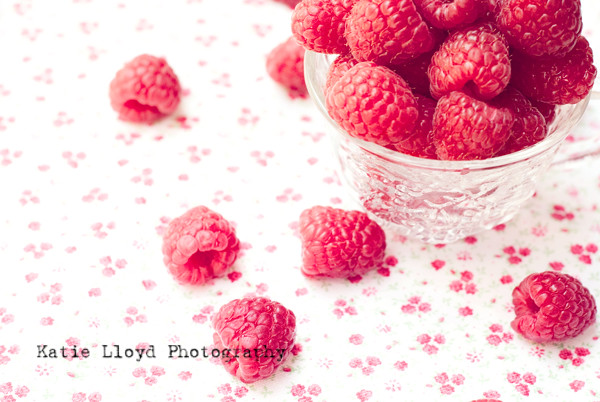
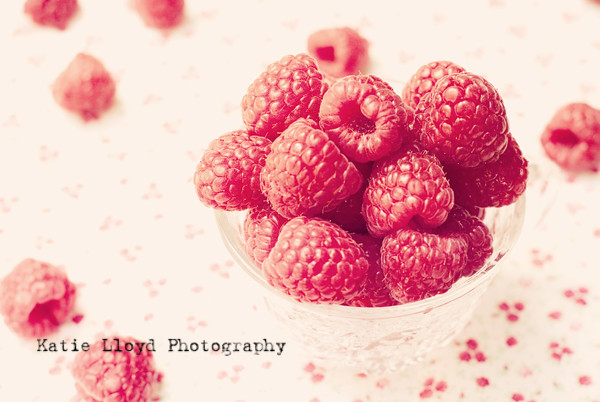
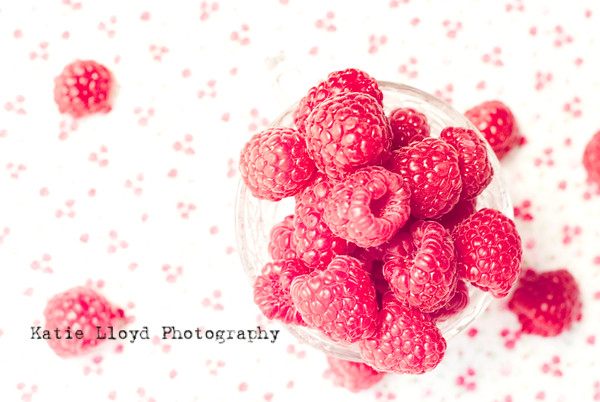
The shots I had for today just didn't make the cut and I had neither the time nor energy to redo them, so I'm scrapping those and sharing some shots I took yesterday of delicious red raspberries.


Raspberries-in-cup-8


These shots look exactly how I envisioned them when I was picking out my berries at the store!
It has been quite some time since the vision in my mind and the final image on my computer matched.
And boy, does it feel nice!


Raspberries-bleach-70-2


and then, she {snapped}


If you Like me on Facebook, you've likely seen these shots along with a few alternative edits.
And if you follow me on Twitter, then you've likely heard about them. ;)


Raspberries-in-cup---bleach


I hope they are worth all the hype.


Give me your best shot at Better in BulkPhotoStory Friday

Thursday, February 10, 2011

Before & After: Using the Recompose Tool in PSE


Lately I've been working on expanding the list of tools I use in Photoshop Elements. One of the more recent tools I've started using is the recompose tool. 

This thing is awesome!

I'm sure some of you already use this, but I'm also sure many of you don't.
If you're anything like me, it looks and sounds a bit intimidating.
But trust me, it is simple!


I took the following two images plus a texture and threw them all together. Then I added a bit of text.
hot-air-balloon-orig---wm clouds-wm


And this is the final product:
Hot-Air-Balloons---5x7-wm

As I mentioned above, I use PSE 8.

I took a LOT of very in-depth steps to get to my final image.
(If you want to know the exact path and steps I took, let me know and I'll make a screen shot tutorial of it.)

Once I had everything just how I wanted it, I realized my image was composed in such a way that I was not able to retain all of the balloons if I cropped it to the size I wanted.

Enter the handy dandy - recompose tool!

To get to it, click on the tiny expand arrow in the lower right hand corner of the crop tool.
You can also get to it by hitting C on your keyboard...you'll probably need to hit the C key twice.
balloon-edit-ss8

Click on the recompose tool.
(if your computer is slow like mine, it may take a little while for it to go)
You'll now most likely see a pop up window asking how you want to use the tool.

If this is new for you, you'll probably want the first option - sorry I can't remember what it's called...I have that pop up box turned off.
After clicking the first option in that box, you'll get a crop box around your image. I personally have better success when I manually drag the sides to the approximate size I want. You can also go up to the options bar at the top of PSE and adjust from there, but I find it to be too temperamental for my patience.

For this particular image, I pulled the bottom side up until it was about where I thought it should be.

All you need to do at this point is let go of your mouse or touch pad. PSE will do the rest!
If you like what you see, click the check box in the bottom right. If not, click the X box...just like you do when cropping.

I've found that the recompose tool works best when there is ample negative space in a photo. It will still work with other shots, but know that some things may be shortened, etc.


 and then, she {snapped}


LinkWithin

Related Posts Plugin for WordPress, Blogger...